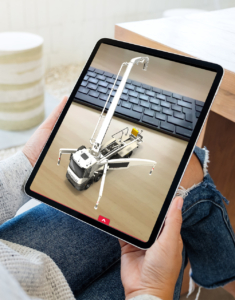
How Web AR works – augmented reality directly in your browser
Web AR (web-based augmented reality) is an innovative form of augmented reality that works entirely without installing an app. Users only need a smartphone, tablet, or computer with a camera and internet access—and they can immerse themselves in an augmented world via their browser (e.g., Safari, Chrome, or Firefox).
1. Getting started: QR code or web link
Access to a WebAR application is usually via a QR code or a web link. When the user scans the code or clicks on the link, the AR application opens automatically in the browser. No downloads, no registration – a decisive advantage over traditional app solutions. This makes WebAR accessible, fast, and flexible to use – ideal for marketing campaigns, trade shows, or product presentations.
2. Access to camera and sensors
As soon as the application starts, the browser requests access to the device’s camera. This camera serves as a “gateway” to augmented reality: it recognizes the real environment and allows digital content to be placed precisely within it. Modern WebAR systems also use the device’s motion sensors to capture position and perspective in real time. This creates a realistic interaction between the physical world and virtual elements.
3. Tracking and placement
A tracking engine runs in the background, ensuring that virtual objects remain firmly anchored in space. This can be achieved using various methods:
- Image tracking (recognition of a specific image or logo),
- Surface tracking (detection of surfaces or floors) or
- Face tracking (detection of faces for filters and masks).
Depending on the application, 3D models, animations, videos, or interactive buttons are displayed.
4. Rendering and interaction
The rendering, i.e., the display of virtual objects, takes place directly in the browser—usually via WebGL or WebXR technologies. These enable high graphics quality and smooth movements without overloading the device. Users can interact with the AR elements: rotate products, call up information, or trigger animations—all intuitively via touch or movement.
5. Data, hosting, and security
WebAR content is hosted on secure web servers. When accessed, only the necessary data is loaded—no sensitive information or personal data is stored. This makes WebAR not only convenient, but also compliant with data protection regulations and sustainable, as no permanent app remains on the device.
Conclusion:
WebAR instantly connects the real and digital worlds in an app-free and interactive way. It lowers barriers to entry, increases reach, and brings brands, products, and ideas to life—anywhere, anytime. Real experience with Web AR on the World Wide Web.